Tutorial 5: Split Oversized Traces
The Problem
Some traces in the dataset are abnormally large. This happens when the tracing algorithm incorrectly groups multiple chromatin fibers into a single trace. These oversized traces distort downstream distance and contact analyses.
How trace_splitter Works
trace_splitter uses a two-step approach:
Measure trace size — Compute the radius of gyration (Rg) of each trace. Rg is the average distance of all barcode positions from the trace’s center of mass:
Rg = sqrt( mean( |position - center_of_mass|² ) )A larger Rg means the trace is more spread out in 3D space.
Split large traces — Traces with Rg above a threshold (
mean + std_threshold × std) are split into sub-traces using K-means clustering on their 3D coordinates. Each resulting cluster gets a new Trace_ID.
Input
The duplicate-cleaned trace file from Tutorial 4: merged_traces_cleaned_intensity.ecsv
[1]:
import matplotlib.pyplot as plt
import matplotlib.image as mpimg

data_path = "/home/devos/Documents/data_to_compare_pdx1/PDX1"
dest_path = f"{data_path}/"

input_trace = f"{dest_path}/merged_traces.ecsv"

print(f"Input: {input_trace}")
Input: /home/devos/Documents/data_to_compare_pdx1/PDX1//merged_traces.ecsv
Step 1: Run QC Before Splitting
First, let’s run trace_analyzer on the input to have a reference for comparison.
[7]:
!trace_analyzer --input {input_trace}
1 trace files to process= /home/devos/Documents/data_to_compare_pdx1/PDX1//merged_traces.ecsv
$ Importing table from pyHiM format
Successfully loaded trace table: /home/devos/Documents/data_to_compare_pdx1/PDX1//merged_traces.ecsv
> Analyzing traces for /home/devos/Documents/data_to_compare_pdx1/PDX1//merged_traces.ecsv
$ Number of spots in trace file: 31407
$ Calculating overall barcode detection across 3388 traces...
$ Exporting barcode detection plot to: /home/devos/Documents/data_to_compare_pdx1/PDX1//merged_traces_barcode_detection.png
$ Saved neighbor distances plot: /home/devos/Documents/data_to_compare_pdx1/PDX1//merged_traces_first_neighbor_distances.png
$ Mean distances between neighboring barcodes: X=-0.000, Y=-0.001, Z=-0.021
$ Calculating barcode stats...
$ Exporting relative barcode frequencies figure to: /home/devos/Documents/data_to_compare_pdx1/PDX1//merged_traces_relative_barcode_frequencies.png
$ Saved KDE projection plot: /home/devos/Documents/data_to_compare_pdx1/PDX1//merged_traces_kde_projections.png
Finished execution
[8]:
# Display reference plots
before_stats = f"{dest_path}/merged_traces_trace_statistics.png"
before_detect = f"{dest_path}/merged_traces_barcode_detection.png"

fig, axes = plt.subplots(1, 2, figsize=(20, 6))
for ax, f, title in zip(axes, [before_stats, before_detect],
                         ["Trace Statistics (before split)", "Barcode Detection (before split)"]):
    ax.imshow(mpimg.imread(f))
    ax.set_title(title, fontsize=14)
    ax.axis('off')
plt.tight_layout()
plt.show()

Step 2: Split Oversized Traces
Run trace_splitter with default parameters:
--std_threshold 1.0— split traces with Rg > mean + 1×std--num_clusters 2— split each oversized trace into 2 sub-traces
[9]:
!trace_splitter --input {input_trace}
1 trace files to process= /home/devos/Documents/data_to_compare_pdx1/PDX1//merged_traces.ecsv
$ Importing table from pyHiM format
Successfully loaded trace table: /home/devos/Documents/data_to_compare_pdx1/PDX1//merged_traces.ecsv
Applying K-means clustering with 2 clusters on traces with Rg > mean + 1.0 * std_dev...
$ Mean Rg: 0.582, Std Rg: 0.780, Threshold: 1.363
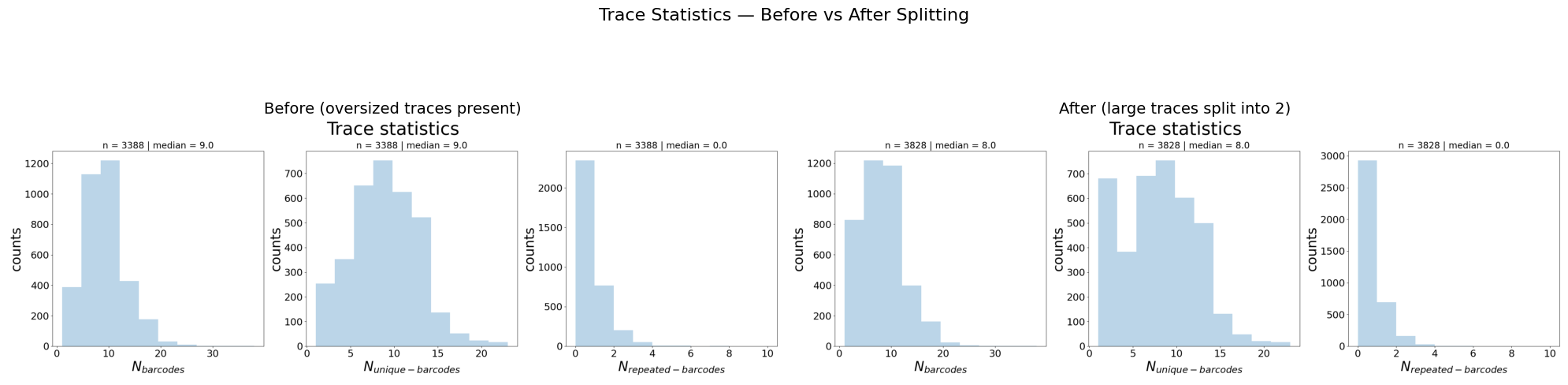
$ Number of traces split: 440/3388
$ Saving output table as /home/devos/Documents/data_to_compare_pdx1/PDX1//merged_traces_split.ecsv ...
The output reports:
The computed Mean Rg, Std Rg, and Threshold
Each trace that was split, with its Rg value
Total number of traces split vs total
The output file is saved as <input>_split.ecsv alongside the input.
Step 3: Compare Before vs After
Run trace_analyzer on the split output and compare the trace statistics.
[10]:
split_trace = f"{dest_path}/merged_traces_split.ecsv"
!trace_analyzer --input {split_trace}
1 trace files to process= /home/devos/Documents/data_to_compare_pdx1/PDX1//merged_traces_split.ecsv
$ Importing table from pyHiM format
Successfully loaded trace table: /home/devos/Documents/data_to_compare_pdx1/PDX1//merged_traces_split.ecsv
> Analyzing traces for /home/devos/Documents/data_to_compare_pdx1/PDX1//merged_traces_split.ecsv
$ Number of spots in trace file: 31407
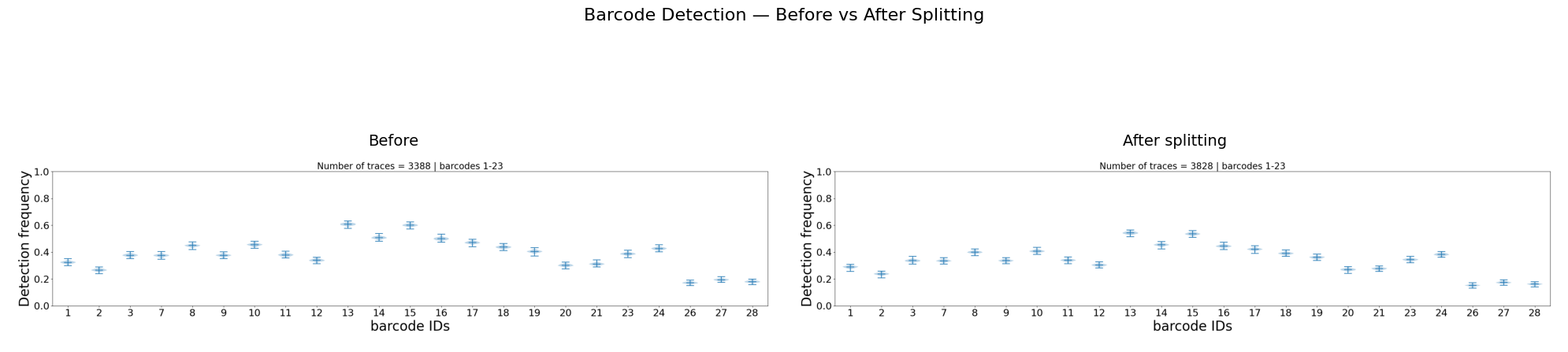
$ Calculating overall barcode detection across 3828 traces...
$ Exporting barcode detection plot to: /home/devos/Documents/data_to_compare_pdx1/PDX1//merged_traces_split_barcode_detection.png
$ Saved neighbor distances plot: /home/devos/Documents/data_to_compare_pdx1/PDX1//merged_traces_split_first_neighbor_distances.png
$ Mean distances between neighboring barcodes: X=-0.001, Y=-0.001, Z=-0.003
$ Calculating barcode stats...
$ Exporting relative barcode frequencies figure to: /home/devos/Documents/data_to_compare_pdx1/PDX1//merged_traces_split_relative_barcode_frequencies.png
$ Saved KDE projection plot: /home/devos/Documents/data_to_compare_pdx1/PDX1//merged_traces_split_kde_projections.png
Finished execution
[12]:
# Compare: Trace Statistics before vs after
after_stats = f"{dest_path}/merged_traces_split_trace_statistics.png"

fig, axes = plt.subplots(1, 2, figsize=(20, 6))
for ax, f, title in zip(axes, [before_stats, after_stats],
                         ["Before (oversized traces present)",
                          "After (large traces split into 2)"]):
    ax.imshow(mpimg.imread(f))
    ax.set_title(title, fontsize=14)
    ax.axis('off')
fig.suptitle("Trace Statistics — Before vs After Splitting", fontsize=16)
plt.tight_layout()
plt.show()
[13]:
# Compare: Barcode Detection before vs after
after_detect = f"{dest_path}/merged_traces_split_barcode_detection.png"

fig, axes = plt.subplots(1, 2, figsize=(20, 6))
for ax, f, title in zip(axes, [before_detect, after_detect],
                         ["Before", "After splitting"]):
    ax.imshow(mpimg.imread(f))
    ax.set_title(title, fontsize=14)
    ax.axis('off')
fig.suptitle("Barcode Detection — Before vs After Splitting", fontsize=16)
plt.tight_layout()
plt.show()
What to check:
N_barcodes (left panel) shifts left: split traces have fewer barcodes each
Total trace count increases: each split creates one extra trace
Barcode detection may change slightly as trace composition is modified
About the Parameters
trace_splitter accepts two parameters with sensible defaults:
Parameter |
Default |
Effect |
|---|---|---|
|
1.0 |
Traces with Rg > mean + N×std are split. Lower = more aggressive. |
|
2 |
Number of sub-traces after splitting. |
The defaults are recommended for most datasets. Changing them requires a good reason:
Lowering
--std_threshold(e.g. 0.5) splits more traces, risking splitting legitimate extended conformationsRaising
--std_threshold(e.g. 2.0) only splits extreme outliers--num_clusters 3would only make sense if you suspect three distinct fibers were merged into a single trace, which is rare
When in doubt, keep the defaults and inspect the results.
Summary
What |
How |
|---|---|
Detect oversized traces |
Radius of gyration (Rg) > mean + std |
Split them |
K-means clustering on 3D coordinates |
Default behavior |
Split into 2, threshold at mean + 1×std |
trace_splitter only modifies traces above the Rg threshold. All other traces pass through unchanged.